The right caregiver pager system helps families and care teams respond quickly to loved ones in need. This article highlights five reliable options designed for homes, nursing facilities, and assisted living environments. Each product uses wireless technology to deliver instant alerts, status updates, and customizable reminders—without costly monthly fees in many cases. Read on to compare features, ranges, and ease of use, so you can choose a dependable solution for everyday safety and peace of mind.
Summary of chosen products
| Product | Brand | Key Benefit |
|---|---|---|
| PILSAMAS WiFi Caregiver Pager System | PILSAMAS | Wi-Fi hub with 328 ft range; app alerts; no monthly fee |
| CallToU Caregiver Pager Wireless System | CallToU | Long range; multiple tones; portable receiver |
| FullHouse Caregiver Pager System | Full House | Up to 1000 ft range; IP55 waterproof; multiple melodies |
| PILSAMAS 3 Pack Wireless Call Buttons | PILSAMAS | Three-button set; Wi-Fi access; app alerts |
| CallToU TY01WH-US Bundle | CallToU | Wi-Fi connected; 328 ft range; family sharing alerts |
PILSAMAS WiFi Caregiver Pager System

The PILSAMAS system uses a Wi-Fi hub combined with 433MHz wristband and call buttons, delivering a 328-foot range through walls. It instantly identifies who needs help and where, using red LED indicators and audible alerts. The accompanying app supports customizable tones and volumes, plus naming of devices (for example, “Bedroom Button”). The hub remains under lifetime free updates and notifications, with optional SMS, call, or email alerts through a plan. This setup is suitable for homes, nursing facilities, and hospitals seeking a subscription-free option in many cases.
Key points include: quick identification of the person in need, scalable alerts across multiple caregivers, and flexible notification options. The system supports up to six distinct devices, enabling families to monitor different rooms or areas. While designed for ease of use, initial setup requires Wi-Fi access and pairing of the hub with the buttons and wristband.
CallToU Caregiver Pager Wireless System

This system emphasizes a long-range, flexible setup with one receiver and one call button. The receiver can be carried or placed anywhere, supporting a 500+ foot open-area range. It offers 55 ringtones and five volume levels for clear, distinct alerts. The call button can be worn as a pendant or mounted on a wall, making it adaptable for a variety of living spaces. A straightforward plug-in receiver ensures quick deployment, though wall placement for the button improves reliability in denser layouts.
Considerations include the balance between range and wall penetration, the availability of multiple alert tones, and the need for the receiver to remain plugged in. Subscribers should note the option to add alert subscriptions for enhanced communications beyond the no-subscription base.
FullHouse Caregiver Pager System

The FullHouse system offers up to 1000 feet of range in open air and 500 feet through walls, with IP55 waterproof components suitable for bathrooms and areas with moisture exposure. It includes a waterproof call button with 52 melodies to choose from. The system is designed for home and clinical environments, ensuring caregivers can respond rapidly while residents enjoy greater freedom. The setup supports home use without monthly fees, though it is important to keep the buttons away from full immersion in water during bathing and to monitor battery life.
Strengths include extended range, water resistance for safe bathroom use, and a broad selection of melodies to reduce alert fatigue. Potential trade-offs involve ensuring good wall penetration in larger homes and the need to manage updates or replacements when devices wear out.
PILSAMAS 3 Pack Wireless Call Buttons

The PILSAMAS three-pack focuses on broad coverage with 230-foot range via 433MHz technology, bridging through walls and doors. The hub connects to 2.4G Wi-Fi for global app access, though it does not support 5G. Pressing a panic button triggers an audible alarm and an app alert, with the ability to share notifications with family members. The app supports remote monitoring, alarm history, and customizable settings for ringtone, duration, and volume. It is a practical choice for families needing multiple call points within a single residence or small facility.
Considerations include the balance of hub reliability, Wi-Fi compatibility, and the need for SMS or email alerts which may require a subscription. Device status and battery checks in real time help maintain readiness in daily use.
CallToU TY01WH-US Bundle
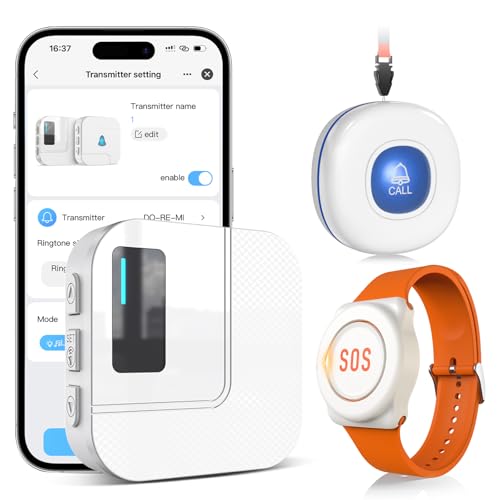
The TY01WH-US bundle centers on Wi-Fi connectivity with a 328-foot range and 2.4G Wi-Fi support. It provides instant app notifications and the option to subscribe to phone or text alerts for a monthly fee. The sharing feature enables alerts to be sent to multiple family members, making it suitable for households with caregivers in different locations. The bundle emphasizes ease of use and scalable alerts, alongside the typical advantages of a caregiver pager system, including wall-penetrating signals and clear audible alerts.
Purchase considerations include the ongoing cost of optional notifications, the number of devices supported, and how easily alerts can be shared among caregivers. For households already using the Tuya app ecosystem, this option can be a natural fit.
Buying Guide: Key Purchase Considerations and Comparisons
- Range and signal penetration: Look for devices that advertise open-air and through-wall ranges. Homes with multiple rooms or apartments require strong wall penetration to ensure reliable alerts.
- Connectivity: Decide between 2.4GHz Wi-Fi only and optional 5G compatibility. 2.4GHz tends to have broader compatibility with older routers and devices, while 5G is not always necessary for caregiver systems.
- Number of devices and zones: If you have multiple rooms or caregivers, choose a kit that supports several buttons, receivers, and user-designated zones (for easy identification of who needs help).
- Alerts and notification options: Consider whether the system offers in-app alerts, push notifications, SMS, or email. Subscription-based alerts can add monthly costs; assess the total long-term cost.
- Ease of use and maintenance: Simplicity matters for seniors and caregivers. Look for clear indicators, easy button access, and straightforward battery or power management.
- Water resistance and placement: If bathrooms or kitchens are areas where alerts are common, IP-rated or splash-proof devices help. Ensure devices are placed in reachable locations for the resident and caregiver.
- App features and privacy: Check for alarm history, device naming, and the ability to share alerts securely with family members. Review privacy and data-handling policies of any app ecosystem.
- Cost structure: Compare upfront hardware costs and any ongoing subscription fees for enhanced notifications. A no-subscription option can reduce long-term expenses, but verify what features are included.
- Durability and battery life: Look for long-lasting batteries and robust hardware suitable for daily use. Some devices include battery life indicators to prevent missed alerts.
Overall, the best choice depends on the living environment, the number of caregivers, and the desired balance between upfront hardware costs and ongoing notification services. For homes that prioritize independence with minimal ongoing expenses, systems with a strong no-subscription option and reliable wall-penetrating range are ideal. For multi-room facilities or families with remote caregivers, a solution offering easy sharing, multiple devices, and clear app alerts provides the most comprehensive coverage.