Answering the need for clear, easy-to-read calendars and reminders, these clocks are designed for people with memory challenges. This guide highlights five reliable options that emphasize large displays, straightforward day and date readouts, and flexible alarms or reminders. Best for seniors who benefit from consistent daily cues, memory support, and simple operation.
| Product | Display Style | Best For | Why It Stands Out |
|---|---|---|---|
| SSYA Digital Calendar Alarm Clock | 7″ HD LCD; non-abbreviated readout | Seniors with memory loss needing clear time wording | Distinct day parts and auto dimming with brightness options |
| Clock With Day And Date For Elderly (Roxicosly) | 7″ HD display; day/date; icons for time periods | Those needing intuitive time-period cues | 20 alarms and reminders; vivid day/night icons |
| SSINI Digital Calendar Dementia Alarm Clock | 7″ display; 5 display modes | Users needing multiple display modes and many alarms | 12 alarms and 3 medication reminders; multilingual support |
| Soobest 12” Dementia Clock | 12” HD display; 4 display modes | Users who benefit from large size and flexible modes | Up to 20 alarms; flexible reminders |
| American Lifetime 2026 Dementia Clock | Large display; day/date | Simple, reliable calendar clock for daily routines | Clear visibility and easy setup |
SSYA Digital Calendar Alarm Clock

- Best for readers who need explicit, non-abbreviated time and date cues. The 7-inch HD LCD clearly spells out the time and day of the week, with defined morning, afternoon, evening, and night blocks.
- Best for caregivers seeking a plug-and-play device with adjustable brightness and optional auto-dimming.
- Limitation: The auto-dimming mode may be preferred for some users who want fixed brightness; five brightness levels provide alternatives.
2026-2027 Wall Calendar – BowCuk

- Best for planning and scheduling beyond time-telling. Large print and big grid make it easy to visualize monthly plans at a glance.
- Best for users who prefer a traditional wall calendar with a broad open layout and notes area.
- Limitation: Not a clock; requires separate time-telling device if a single-display solution is desired.
Roxicosly Clock With Day And Date For Elderly

- Best for seniors who benefit from visual time-of-day cues using sun and moon icons. The 7-inch display shows time, date, and day of week clearly.
- Best for users who need up to 20 alarms and 20 reminders for daily tasks and medications.
- Limitation: Power adapter required; battery storage is only for settings retention during power loss.
Soobest 12” Dementia Clock
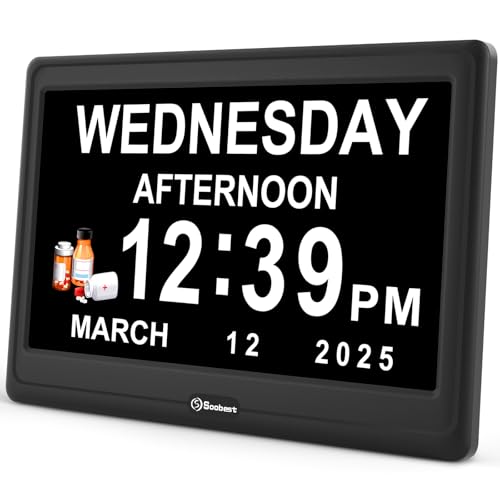
- Best for users who want a large screen and multiple display modes, including color and analog options for varied readability.
- Best for memory schedules with up to 20 alarms and date reminders, useful for medications and daily routines.
- Limitation: Larger size may require more wall or surface space; consider room layout before purchase.
SSINI Digital Calendar Dementia Clock

- Best for homes needing a multilingual option and many reminders. It supports 12 alarms and 3 medication reminder sets.
- Best for clarity with five display modes to suit different preferences, from wall clock to modern digital looks.
- Limitation: May require some initial setup to leverage the multiple display modes and languages.
American Lifetime 2026 Dementia Clock
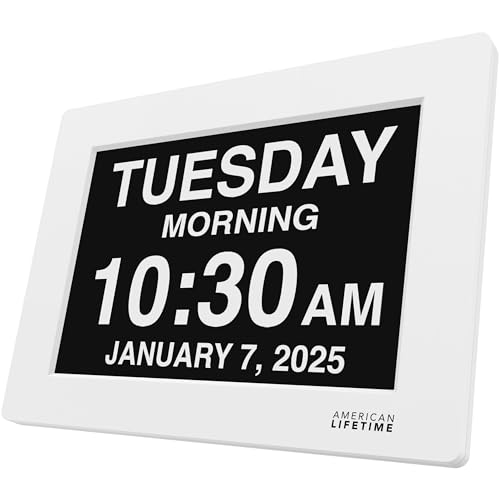
- Best for a straightforward calendar clock that emphasizes daily routines with a large, high-contrast display.
- Best for simplicity and reliability in a single, accessible device for elderly users.
- Limitation: Fewer advanced reminder options than models with dozens of alarms; ideal for basic needs.
Digital Clock With Date And Week For Seniors

- Best for those who need both date and week visibility with multiple alarm options and reminders.
- Best for users who want a power-adapter-based clock with backup settings retained, ensuring consistent performance.
- Limitation: Requires power adapter; battery backup only stores settings, not the time when power is out.
Buying Guide: Key Considerations For Alzheimer’s And Dementia Calendars
- Display size and readability: Look for 7–12 inch screens with high-contrast digits and non-abbreviated time blocks. This improves independence and reduces confusion.
- Time-of-day cues: Models with clearly labeled morning, afternoon, evening, night, and pre-dawn sections help orient daily routines.
- Alarms and reminders: Consider how many alarms you need, whether you require medication reminders, and if date-specific alerts matter. A mix of daily and date-specific reminders can prevent missed tasks.
- Auto dimming vs. fixed brightness: Auto-dimming helps comfort at night, while some users prefer consistent brightness for daytime clarity.
- Display modes: Some clocks offer multiple display styles (digital, color, or analog). Choose a mode that the user finds easiest to interpret.
- Power and backups: Most clocks rely on a mains power adapter; check whether a backup battery stores settings during outages.
- Language and regional settings: If language support or localization matters, consider models that offer multiple languages.
- Physical footprint: Ensure there is adequate space on a wall or table where the clock will reside, especially for larger 12” models.
FAQ
- What makes calendar clocks helpful for Alzheimer’s patients? They provide clear, non-ambiguous cues for time, date, and daily routines, reducing confusion and supporting independence.
- How many alarms are typically needed? Most users benefit from 6–20 alarms for medications, meals, and appointments, plus reminders for specific tasks.
- Is auto dimming important at night? Yes, auto dimming reduces glare and can improve sleep quality by adjusting brightness to lower levels after sunset.
- Can these clocks be wall-mounted? Yes, many models are designed to be hung on a wall or placed on a table, depending on user preference.
- Do these clocks require any special installation? Most are plug-and-play; some models may require initial setup to configure alarms, time zones, and display modes.
- Are color and icon cues necessary? Visual icons for times of day (sun and moon) often help users recognize periods at a glance and reduce confusion.