Direct answer: The best options are emergency call bells with large, accessible buttons, reliable wireless ranges, and clear audible/visual alerts. These systems suit quadriplegic patients who need effortless, immediate access to assistance from caregivers. Top picks include compact touch-pad switches, wireless nurse-call setups with multiple transmitters, and long-range pagers. The following selections balance ease of use, accessibility, and expandability for homes and care facilities.
| Product | Best For | Key Benefit |
|---|---|---|
| E-Z Call 32513 Universal Quadriplegic Nurse Call Switch | Home use, limited-mobility users | Touch pad for easy summon |
| CallToU Wireless Calling System with 10 Buttons | Small to medium facilities | Display receiver shows room number |
| SavvyMate Wireless Call Button System | Homes and assisted living | Long range with durable ABS buttons |
| CallToU Wireless Caregiver Pager System (3 Receivers) | Hospitals, clinics, larger homes | Multiple receivers for wide coverage |
| CallToU Caregiver Pager System with 3 Receivers (1000+ ft) | Large facilities, multi-room care | Very long range, repeat alerts |
E-Z Call 32513 Universal Quadriplegic Nurse Call Switch
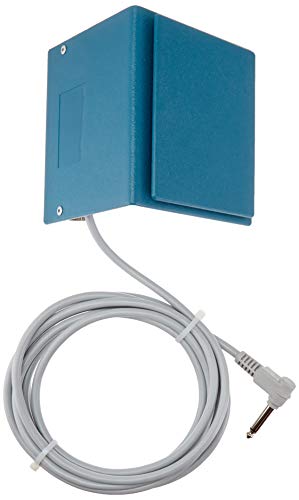
- Brand: Med Labs, Inc.
- Type: Call Switch with Cord; 3.5″ x 5″ touch panel
- Use: Enables clients with limited movement to summon help
- Best for: Home care settings or where a central call system is not available
The E-Z Call switch is best for users who need a simple, wired solution with a tactile touch panel. It is suitable for home environments or temporary setups where central systems are not installed. Limitations include reliance on a corded connection, which may restrict placement flexibility.
CallToU Wireless Calling System with 10 Buttons

- Brand: CallToU
- Features: Upgraded display with call-number announcements; expandable to 1000 call buttons
- Best for: Medium to large facilities needing scalable coverage
- Limitation: Performance can vary with building materials; ensure open space coverage
SavvyMate Wireless Call Button System

- Brand: SavvyMate
- Features: 1,000 ft open-area range; 30 waterproof buttons; 15 volume levels
- Best for: Homes, assisted living, and small clinics needing reliable long-range alerts
- Limitation: Range may vary by walls and materials; best used with clear lines of sight
SavvyMate offers strong long-range performance and a robust set of tones and volume levels, making it adaptable for various noise environments. The waterproof buttons are practical for bathrooms and other moist areas.
CallToU Wireless Caregiver Pager With 3 Receivers

- Brand: CallToU
- Features: 3 receivers; 2 call buttons; 500+ ft range; neck strap option
- Best for: Home care and small clinics needing portable alerting
- Limitation: Noisy environments may require higher volume adjustments
With multiple receivers, this setup provides flexible coverage across living spaces. It supports easy carrying and neck-strap wearability for patients and caregivers alike.
CallToU Wireless Caregiver Pager System (1000+ ft)

- Brand: CallToU
- Features: Upgraded display; voice announcements; expandable to 1000+ buttons
- Best for: Larger facilities, hospitals, and multi-room care areas
- Limitation: Setup and maintenance may require planning for large environments
This system offers extended range and multiple alerts suitable for large homes or care facilities. The voice announcements aid rapid identification of rooms in need of assistance.
Buying Guide
- Range and coverage: Evaluate open-area range versus building materials. Longer ranges suit multi-room homes and larger facilities; consider repeaters or additional receivers for more coverage.
- Button and display design: Choose large, accessible buttons or touch panels for quadriplegic users. Display receivers should clearly indicate room numbers or caller identity.
- Expandability: If you anticipate growth, prioritize systems that add more buttons, receivers, or zones without major reconfiguration.
- Power and placement: Wired switches are reliable but limit placement; wireless systems offer flexible placement but depend on outlet availability for receivers.
- Auditory and visual cues: Blend audible alerts with visual indicators where possible. Adjustable volume helps adapt to loud environments.
- Durability and environment: Waterproof or splash-safe buttons are beneficial in bathrooms and kitchens. Durable shells reduce accidental activation.
Frequently Asked Questions
- What should I consider when choosing a call bell for quadriplegia?
Answer: Look for ergonomic buttons, reliable wireless range, easy integration with caregivers, and clear alerting options. - Are wireless systems better than wired ones for home use?
Answer: Wireless systems offer placement flexibility and easier expansion, but ensure battery life and signal stability. - Can these systems work in multi-story homes?
Answer: Yes, many models support long-range signals or multiple receivers to cover different floors. - What is the importance of display receivers?
Answer: Display receivers help staff identify caller location quickly, improving response times. - Do these systems require professional installation?
Answer: Most are designed for straightforward setup, but larger setups may benefit from professional help for optimal placement. - Which option is best for large facilities?
Answer: Systems offering 1000+ ft range and multiple receivers are suited for clinics, hospitals, or large homes.