Looking for a reliable continuous glucose monitor (CGM) sensor that provides real-time data and actionable insights? This guide highlights five strong options, detailing who each product is best for, key features, and practical trade-offs. Whether you’re managing prediabetes, diabetes, or simply tracking how foods affect your glucose, these CGM sensor solutions cater to different monitoring needs and lifestyles.
| Product | Brand | Best For | Key Benefit |
|---|---|---|---|
| Stelo Glucose Biosensor & App | Stelo | Non-insulin users seeking 15-day wear with app insights | 2-pack sensors with 15-day wear each |
| Lingo CGM | Lingo | Real-time tracking for nutrition and lifestyle insights | 24/7 glucose tracking with user-friendly app |
| Lingo CGM Pack of 2 | Lingo | Multiple-sensor rotation for continuous coverage | Two 14-day biosensors for extended use |
| iHealth Acacia CGM Kit | iHealth | Simple, no-app option with straightforward data logging | No coding required; easy start |
| VivaGuard Talking Blood Glucose Kit | VivaGuard | Elderly or visually-impaired users needing audible readings | Voice readouts and 1000-memory storage |
Stelo Glucose Biosensor & App by Dexcom

Best for non-insulin users seeking 15-day wear with a companion app. The Stelo biosensor is designed for adults 18 and older who are not on insulin or dialysis. It offers 24/7 tracking and personalized insights to reveal glucose patterns. The 2-pack provides extended wear, with a replacement promise if a sensor fails before the wear time ends. Consider this option if you want a clinician-like monitoring experience without insulin dependency. Caution: not suitable for individuals on insulin therapy or with certain hypoglycemia risks.
Lingo Continuous Glucose Monitor (CGM)
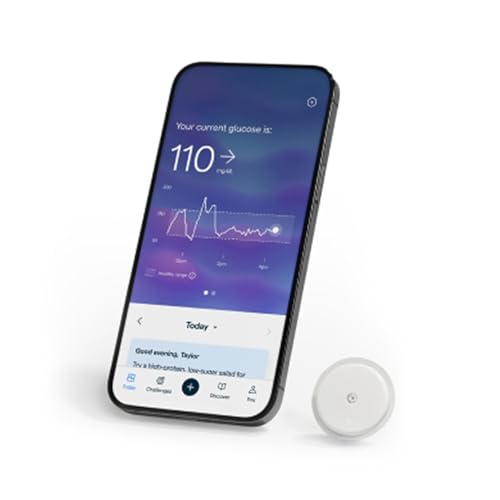
Best for real-time glucose tracking with lifestyle insights. The Lingo CGM offers continuous glucose data and notes how meals, exercise, and sleep affect your glucose. It’s compatible with iOS and Android, with the possibility of HSAs/FSA eligibility depending on your plan. Users often choose Lingo to optimize nutrition and build healthier habits. Caution: check device compatibility with your phone’s OS version before purchasing.
Lingo CGM Pack of 2

Best for users who want continuous coverage with back-to-back sensors. This pack provides two 14-day sensors for extended CGM use, supporting ongoing glucose trend analysis without frequent reordering. It’s ideal for people who prefer fewer sensor changes while maintaining 24/7 tracking. Caution: availability may vary by region; confirm which components are included in the pack.
iHealth Acacia Blood Glucose Monitor Kit

Best for users who want a simple, no-coding CGM experience with straightforward data logging. The Acacia kit includes strips, lancets, and a monitor with memory features. It’s a practical choice for beginners or those who prefer a device without app integration. Caution: it is more of a traditional glucometer approach than continuous wearable CGM for real-time remote monitoring.
VivaGuard Talking Glucose Monitor Kit

Best for visual or hearing-impaired users needing audible glucose readings. The VivaGuard kit includes a talking function and stores up to 1000 readings. It meets ISO standards for accuracy within a broad measurement range. The main limitation is that it lacks explicit CGM-style continuous wear; it’s more suitable for at-home blood glucose testing with accessibility features. Caution: the kit notes no separate control solution, so plan for testing accuracy with included or compatible solutions.
Buying Guide: Choosing the Right CGM Sensor
- Sensor wear time and replacement: Consider how long each sensor lasts and whether you prefer 14-day or 15-day wear periods to minimize replacements.
- Data access and app support: Decide if you want real-time app-driven insights (nutrition, sleep, activity) or a simpler no-app experience.
- Device compatibility: Check smartphone compatibility (iOS vs Android) and any regional restrictions on US-only devices.
- Best for specific use cases: For insulin users, verify insulin-therapy compatibility; for non-insulin users, focus on sensors designed for that group.
- Cost considerations: Evaluate per-sensor cost, multi-pack options, and whether a replacement promise or warranty is provided.
- Accessibility features: If needed, look for devices with audible readings or large-memory storage for trend analysis.
Frequently Asked Questions
- What is a CGM sensor and who should use one?
A CGM sensor is a wearable device that continuously monitors glucose levels in real-time, ideal for people managing diabetes or wanting ongoing glucose trend data. - Do CGM sensors require a smartphone?
Some CGMs synchronize with apps on iOS or Android, while others operate as standalone readers. Check the product details for compatibility. - How long does a CGM sensor last?
Wear times vary; common durations are 14 to 15 days per sensor, with replacements needed after the wear period ends. - Are CGM sensors covered by insurance?
Some plans offer HSA/FSA eligibility or device-specific coverage. Verify with your insurer and plan administrator. - Can I use a CGM sensor if I’m not on insulin?
Yes, several CGM options are designed for non-insulin users to monitor glucose patterns and daily trends. - What should I consider before buying a CGM pack?
Look at wear time, app features, data accessibility, and whether a multi-pack fits your monitoring schedule and budget.