When a fall happens, timely help matters. This guide targets buyers seeking reliable fall-detection and GPS-enabled medical alert devices. The top picks below emphasize hands-free calls, 24/7 monitoring, and caregiver connectivity. Best for seniors living alone, working caregivers, or anyone needing quick access to emergency assistance.
Summary of chosen products
| Product | Best For | Key Benefit |
|---|---|---|
| SecuLife Medical Alert Pendant | Seniors needing direct family alerts | Auto fall detection with SOS to preselected contacts and 2-way calling |
| Safety+ 4G Medical Alert System | Users seeking nationwide monitoring | Fall detection, GPS, 4G nationwide coverage, caregiver app |
| Medical Guardian MGMini | Compact, discreet protection | OmniSIM on AT&T/Verizon networks, 2-way voice, small device |
| Life Alert Systems (PRNBRH) | Wi‑Fi and caregiver-connected setups | WiFi + wireless signal, multiple receivers, easy setup |
| Family First Alert | Easy activation and nationwide service | 24/7 monitoring, GPS, nationwide coverage |
SecuLife Medical Alert Pendant For Seniors
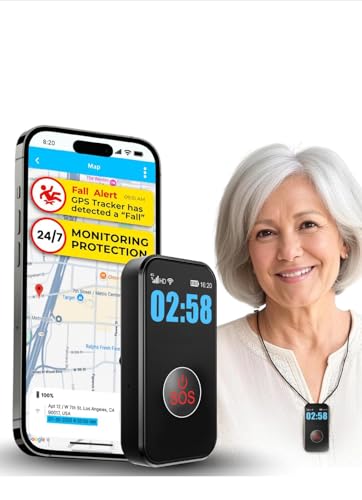
Best for: Seniors who want direct SOS calls to family without a call center intermediary. Why selected: It provides auto fall detection and two-way calling, letting caregivers hear and respond quickly. The device also offers GPS tracking for location awareness, which is critical after a fall.
Limitations: Monthly subscription is required for full features, including unlimited fall alerts and live tracking. The service model relies on cellular connectivity, which may be unavailable in some areas.
Safety+ 4G Medical Alert System

Best for: Users who want 24/7 nationwide monitoring with GPS and caregiver visibility. Why selected: It includes automatic fall detection, GPS location, and a caregiver app, with nationwide 4G coverage designed to keep help within reach indoors or outdoors.
Limitations: Initial month may be included, but ongoing service is a monthly subscription. Activation requires a simple process that will set up the device with the monitoring center.
Medical Guardian MGMini

Best for: People who want a small, discreet device with broad network access. Why selected: The MGMini packs 24/7 monitoring and a two-way speaker into a compact form factor, using omniSIM technology that can access major networks for stronger signal wherever you are.
Limitations: Service requires a subscription after any included trial period, and the device relies on cellular networks for connectivity.
Life Alert System By PRNBRH

Best for: Homes that rely on Wi-Fi with remote caregiver communication. Why selected: It supports multiple receivers and displays, enabling caregivers to identify who needs assistance easily. The system works through a WiFi channel and wireless signal, providing connectivity even if one path is down.
Limitations: Wi-Fi dependency may cause delays if the home network is unstable; some users prefer cellular backup for consistent coverage.
Family First Alert – Advanced Mini System

Best for: Caregivers seeking a robust monitoring setup with clear visibility and easy activation. Why selected: It offers 24/7 emergency monitoring with a strong nationwide network, plus GPS tracking to locate a user quickly in an emergency. The system’s activation process is straightforward for new users.
Limitations: The plan requires ongoing monthly service after any introductory period; ensure the coverage matches the user’s lifestyle and location patterns.
Buying Guide
What should you look for in a medical alert device?
Key features include automatic fall detection, GPS location, 24/7 monitoring, and two-way voice calls. If you live alone or have caregivers monitoring you, prioritizing a device with caregiver alerts and a robust network is essential. Consider whether the device relies on cellular networks (4G/5G) or Wi-Fi, and ensure there is a reliable activation and support process.
Connectivity: cellular vs. Wi-Fi
Cellular devices generally offer broader coverage and better reliability away from home. Wi-Fi-based systems can work well for in-home protection but may be limited by network stability. If you travel or spend time outside, a device with cellular connectivity or omni-network support is preferable.
Power and wearability
Look for waterproof or water-resistant devices and those with long battery life. A compact, lightweight pendant or wristband improves wearability and reduces the chance of removing the device during an unfortunate moment.
Monitoring and caregiver features
Assess whether the system includes 24/7 monitoring, a caregiver app, location sharing, and real-time alerts. A straightforward activation process helps ensure the device is ready when needed.
Costs and contracts
Most systems require ongoing monthly service after any included trial. Budget for activation, plan fees, and potential add-ons such as fall detection. Some providers offer no-contract options; others require long-term commitments. Verify what is included in the plan and what triggers extra charges.
Choosing the right plan
Match the plan to the user’s daily routine. If the user spends most time at home with occasional outings, a system with strong in-home coverage and caregiver notifications may suffice. For those who travel or live in areas with spotty cellular coverage, prioritize devices with nationwide 4G LTE access and reliable GPS.
FAQ
- What happens after I press the emergency button?
- Is fall detection always active?
- Do these devices require a long-term contract?
- Can a caregiver monitor multiple users?
- What if I lose cellular service where I live?
- Is GPS reliable for locating a person after a fall?
Most systems connect to a monitoring center or caregiver via two-way voice, after which responders assess the situation and dispatch help if needed.
Fall detection is available on many devices, but some models require activation or an optional add-on. Check the specific product details to confirm.
Contracts vary. Some plans include a trial period with no long-term commitment, while others require ongoing monthly service. Review terms before purchasing.
Yes, many systems offer caregiver apps that track multiple devices and provide alerts, location data, and status updates in one place.
Choose a device with robust nationwide 4G LTE coverage and, if possible, a hybrid option that can use Wi-Fi as a backup path to alert caregivers.
GPS helps pinpoint location, but performance can vary based on signal strength and environmental factors. Devices with multiple location technologies improve accuracy.