Top picks for medical office ID and insurance card scanning focus on speed, accuracy, and reliability. This guide highlights five models that balance rugged durability with clinic-friendly workflows. Best for busy reception areas, small practices, and mobile off-site registrations, these scanners help capture patient information quickly while reducing data-entry errors. Each option includes a clear use case, a best-for note, and a practical limitation to consider before you buy.
| Product | Best For | Key Benefit | Limitation |
|---|---|---|---|
| Ambir PS667 Simplex A6 Card Scanner | Front desk, single-sided ID cards | Fast 3-second scans; USB-powered; compact | Single-sided only |
| Ambir ImageScan Pro 687-AS Duplex Card Scanner | Back-to-back card data capture | Duplex scanning for front and back; raised-character support | Requires Windows or Mac software integration |
| BizCardReader Medical Insurance Card Scanner w/ Scan-ID LITE | Compact clinics with streamlined workflows | Ultracompact; scans insurance cards and IDs | Lite version does not read licenses |
| DS687 ID Scanner with Software | Out-of-the-box turnkey ID capture | Automatic data extraction; no ongoing fees | Includes software; may require setup |
| Ricoh fi-8040 | Desktops needing high-volume intake | Fast scan speeds; PC-less DirectScan network option | More/larger footprint; higher cost |
Ambir PS667 Simplex A6 Card Scanner
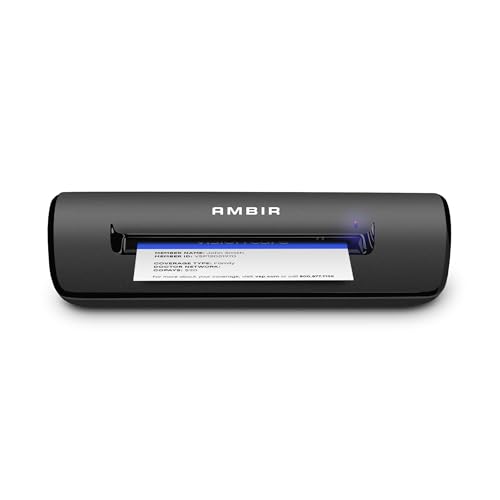
The Ambir PS667 is a compact, USB-powered simplex card scanner designed for fast, reliable ID and insurance card capture. It weighs under a pound and fits on crowded desks or mobile carts, making it ideal for busy reception areas. Scans complete in about three seconds per card, enhancing patient throughput for intake and registration. Best for clinics that primarily need single-sided card captures and require a small footprint.
Best for: front-desk registration teams that need a straightforward, durable scanner with quick turnaround. It’s a strong choice for single-sided ID, insurance, or credit cards with raised characters. A practical caution: it does not scan the back of a card, so duplex needs may require a separate workflow.
Ambir ImageScan Pro 687-AS Duplex Card Scanner

The Ambir 687-AS duplex scanner handles front-and-back scans in a single pass, making it a time-saver for busy clinics collecting comprehensive ID and license data. It supports cards with raised characters and integrates through standard TWAIN drivers, enabling compatibility with widely used software. Best for practices that need complete card data in one image capture. Limitation: software compatibility can vary by system, so verify your practice’s software supports TWAIN before purchase.
Brother DS-640 Compact Mobile Document Scanner

While primarily a document scanner, the Brother DS-640 is noted for its speed and portability, making it a viable option for clinics needing to scan patient documents and IDs on the go. It supports fast color and black-and-white scans up to 16 pages per minute and is powered via USB, enabling use in locations without traditional outlets. Best for mobile check-in stations or small practices with limited desk space. Caution: its primary strength is documents; ID-specific features are not the main focus.
BizCardReader Medical Insurance Card Scanner (Scan-ID LITE)

The BizCardReader BCR901 model focuses on compactness with an ultra-compact footprint, ideal for small front-desk spaces. It scans medical insurance cards, laminated cards, IDs, and photos on a single side, making it a straightforward option for clinics that do not require duplex capture. Included Scan-ID LITE app assists with managing card images, though note that this lite version does not read driver licenses. Best for: small clinics needing a simple, space-saving scanner with basic database management.
RICOH fi-8040 Fast Front Office Scanner

The Ricoh fi-8040 is a robust front-office scanner designed for higher-volume intake needs. It includes a 4.3-inch touchscreen and a “DirectScan” PC-less network destination capability, ideal for clinics that want to streamline intake workflows across devices or departments. It offers strong image processing and reliable performance, making it a better fit for medium to larger practices requiring consistent throughput. Caution: larger footprint and higher cost may be a consideration for smaller offices.
Buying Guide
- Scan type: If you mainly handle single-sided cards, a simplex model like the Ambir PS667 is efficient. For complete card data, choose a duplex scanner such as the Ambir 687-AS or the DS687, which can capture both sides in one pass.
- Workflow integration: Consider drivers and software compatibility. TWAIN support ensures broad software compatibility, while turnkey solutions may reduce setup time.
- Desk space and mobility: Smaller footprints suit crowded front desks or mobile carts. For high-volume intake, a larger, faster scanner like the Ricoh fi-8040 can improve throughput.
- Data management: Some models include companion software for image storage or data extraction. Evaluate whether you need hosted databases, local storage, or direct export to EHRs.
- Reliability and durability: Medical offices benefit from rugged designs and reliable performance over many scans daily. Weight, build quality, and ease of cleaning matter in patient-facing areas.
FAQs
- What is the difference between simplex and duplex scanners? Simplex scans only one side of a card per pass, while duplex scanners capture both sides in a single pass, saving time in high-volume environments.
- Do these scanners work with Windows and Mac? Many listed models support standard drivers like TWAIN, ensuring broad compatibility with common operating systems; check each model’s driver notes for specifics.
- Is a compact scanner suitable for a busy clinic? Yes, compact models work well for front desks with limited space, provided they meet your daily scan volume requirements.
- What features help reduce data-entry errors? Duplex scanning, automatic data extraction, and image management software reduce manual entry and improve accuracy when integrated with the clinic’s software.
- Should I choose a PC-less scanner? PC-less, network-enabled scanners improve workflows in multi-device offices, but may involve a higher initial setup.
- Can I use these scanners for patient photo IDs? Most units handle ID cards and insurance cards; verify image quality and card types with the chosen model before deployment.