If you’re searching for an easy, reliable way to monitor an elderly loved one, a dedicated elderly monitor with camera and audio is a strong choice. These devices are best for caregivers who need quick alerts, clear two-way communication, and optional reminder features without relying on WiFi. This guide highlights five top options and explains who each is best for, plus practical buying considerations to help you pick the right model for daily use in a home or apartment.
| Product | Best For | Key Benefit |
|---|---|---|
| Zaguoroo Elderly Monitor With Camera (No WiFi) | Caregivers seeking instant SOS and medication reminders | One-touch call button, temp alert, night vision |
| JEMXITG Elderly Monitor With Camera (No WiFi) | Privacy-conscious households needing long battery life | 2-way talk, SOS, VOX, no WiFi |
| Zaguoroo Elderly Monitor With Pan-Tilt-Zoom | Families wanting live, continuous viewing | 2-way talk, med reminders, night vision |
| Smart Caregiver Video Monitor (No WiFi) | Mobility-focused caregivers | Rechargeable, infrared night vision, secure connection |
| CallToU Elderly Monitor With Camera (No WiFi) | Users prioritizing private connections | 2.4GHz FHSS, real-time video, SOS |
Elderly Monitor With Camera And Audio — No WiFi

The Zaguoroo model provides 24/7 monitoring with a one-touch call button, medication reminders, two-way audio, infrared night vision, temperature monitoring, and a no-WiFi design. Best for caregivers who need roaming freedom while keeping a close eye on a senior, especially those with medication schedules or temperature concerns. A potential limitation is the reliance on a single base unit that may need placement planning to cover multiple rooms.
JEMXITG Elderly Monitor With Camera
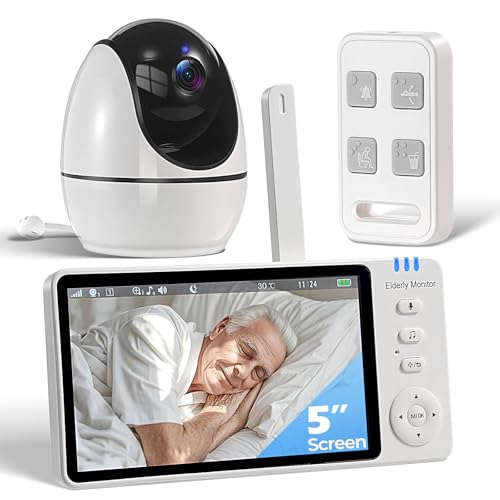
The JEMXITG model emphasizes privacy with no Wi-Fi and a long-lasting 3500mAh battery, alongside 2-way audio, SOS button, medication alerts, and temperature monitoring. This option is best for households that want private, offline operation and extended use between charges. It’s better for scenarios where caregivers need frequent checks during daytime hours and overnight monitoring without Wi-Fi dependency.
Elderly Monitor With Camera And Audio — No WiFi

This Zaguoroo model offers clear two-way talk and a Smart VOX mode that saves battery by waking the screen on sound thresholds. It’s ideal for households that want a balance between active viewing during the day and extended sleep with power-saving features. The caveat is that to keep the screen on 24/7, users may disable VOX, which reduces some energy-saving benefits.
Smart Caregiver Video Monitor For Elderly Care
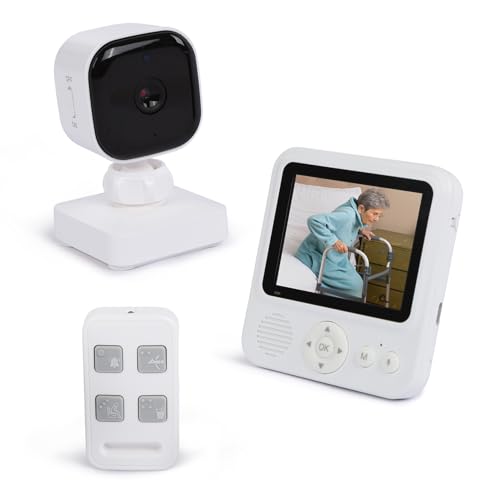
The Smart Caregiver system emphasizes portability and ease of use, featuring a rechargeable monitor, infrared night vision, a secure 2.4GHz connection (no WiFi), and a dedicated wireless call button. It is best for caregivers who need a compact, mobile setup they can carry around the home. A potential limitation is that the display is smaller, which may affect visibility for some users or caregivers with visual challenges.
CallToU 2-Way Talk Monitor With Call Button
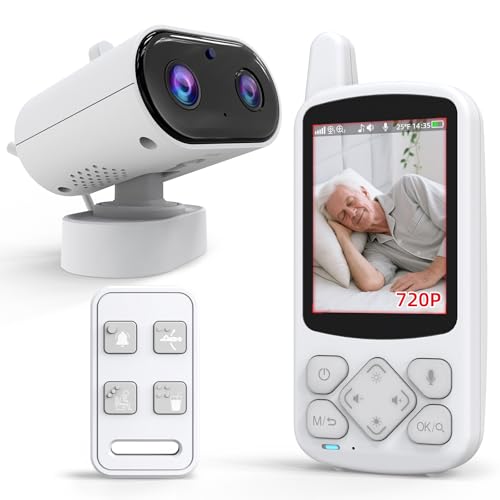
CallToU provides private, no-internet monitoring on a secure 2.4GHz FHSS signal with real-time camera and night vision. The one-press SOS and daily alerts (drink water, move, toilet, help) make it practical for daily care. It’s best for families prioritizing privacy and a straightforward, no-WiFi setup. A limitation to note is potential interference in dense wireless environments; the system relies on a robust FHSS connection for reliability.
SYNLETT Caregiver Pager And Alert System

The SYNLETT system focuses on portable alerts with two wireless call buttons and a wearable pager. It’s ideal for caregivers who need to move around the house while staying alerted to a senior’s needs. The main limitation is that it functions as a pager system rather than a full video monitor, so it’s best when used in conjunction with another video-capable monitor in larger homes or for families prioritizing light-touch alerting over video capability.
CallToU Baby Monitor For Elderly With Camera

This CallToU model emphasizes no-WiFi operation with a reliable, private connection and clear night-vision video. It suits households seeking a simple, private setup and dependable two-way communication for real-time check-ins. A limitation is that some users may prefer a larger display for easier viewing, particularly for caregivers with visual needs.
Elderly Monitors With Camera And Audio — Multi-Alert System

Designed to cover a wide range of scenarios, this Sair pet model offers medicine reminders, SOS, fall, toilet, and drink-water alerts, plus 2-way audio, infrared night vision, VOX, lullabies, and a temperature alarm. Best for seniors who benefit from a robust alert system and dementia-friendly features. Limitation: the feature set is broad, which may be more than some users need, potentially increasing setup complexity.
Buying Guide: Key Purchase Considerations
- No WiFi vs. WiFi: If privacy and internet avoidance are priorities, choose models labeled No WiFi or 2.4GHz FHSS. They provide local-only connections and reduce exposure to online networks.
- Alerts and reminders: Consider whether you need medication reminders, SOS buttons, or daily prompts for hydration and movement. Ensure the device supports the specific alerts your loved one requires.
- Two-way audio and VOX: Look for clear two-way talk and a voice-activated screen (VOX) to save battery, especially if you want longer monitoring between charges.
- Power considerations: Battery life matters for mobility. Some monitors are rechargeable; others rely on constant power. Decide which aligns with your caregiving routine.
- Viewing preferences: A larger display helps with readability, while a compact unit enables easier placement and portability. Consider room layout and the need for pan-tilt-zoom capabilities.
- Alert granularity: Distinct alarms for different scenarios (fall, toilet, medication, water) help caregivers respond quickly. Check if the model supports separate alarm tones or messages.
- Ease of use: Raised tactile buttons and simple remote controls are important for seniors or visually impaired users. Ergonomic design improves daily use and reduces frustration.
- Privacy and security: Ensure the device uses secure local connections and does not expose the elder to external networks unless desired.
Frequently Asked Questions
- What is the advantage of a no-WiFi elderly monitor?
– It operates locally, reducing exposure to online networks and potential privacy concerns while still providing live video and audio. - How important is a SOS alert button?
– It enables immediate caregiver notification for emergencies, increasing response speed in critical moments. - Can these monitors work in multiple rooms without WiFi?
– Many models are designed for local use and can cover adjacent rooms with proper placement, even without internet. - Do these devices require technical setup?
– Most are plug-and-play or feature simple pairing; however, verify buttons, remotes, and screen visibility to match user needs. - Are VOX features useful for monitoring?
– VOX saves battery by waking the display when sound is detected, but you can disable it if you prefer continuous viewing. - Which features should I prioritize for a dementia-friendly home?
– Clear, simple controls; reliable SOS alerts; straightforward reminders; and a readable display.