Answering caregiver and family safety needs, these SOS buttons provide immediate alerts when an elderly person needs help. The top picks are best for at-home use, multi-room monitoring, and easy sharing among family members. Choose based on range, connectivity, and how alerts are delivered (receiver, app, or both).
| Product | Best For | Range / Connectivity | Notes |
|---|---|---|---|
| CallToU Wireless Caregiver Pager System | Single caregiver or small home | 500+ feet | Two receivers, 55 tones, neck strap option |
| Greetmed Caregiver Pager | Multi-room home care | ≥1000 feet (open areas); ~165 feet indoors | 38 melodies, long battery life, wall/desk mounting |
| Daytech Wi‑Fi Caregiver Call Button (1 SOS Watch + 1 Button) | Remote monitoring with app alerts | Wi‑Fi based; works with app | Shared app notifications, 20 alert tones |
| Daytech Wi‑Fi Caregiver Call Button (1 SOS Watch + 2 Buttons) | Family with multiple care receivers | Wi‑Fi based; works with app | 2 buttons plus watch, shared alerts |
| CallToU 1 Receiver + 1 Transmitter | Simple setup for companionship and safety | 500+ feet | Neck strap option, USB outlet-powered receiver |
CallToU Wireless Caregiver Pager System
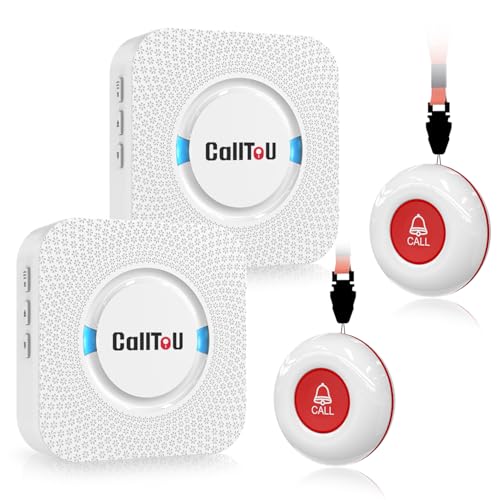
The system includes two receivers and two call buttons for hands-free caregiver coverage. Best for seniors who live in a single home with a need for mobile receivers. It supports a long range of 500+ feet and offers 55 ringtones with five volume levels, allowing clear and customizable alerts. The neck strap option lets the wearer carry the call button as a pendant for quick access. A potential limitation is that the receiver must be plugged into an electrical outlet, which can affect placement flexibility in rooms without outlets.
Who it’s best for: households seeking a straightforward two-transmitter setup with portable receivers and a simple plug-and-play design. Why selected: strong range, multiple tones, and wearable call button options make it versatile for daily elderly care at home.
Caution: Ensure your power outlets are conveniently located to keep receivers powered around the living areas.
Greetmed Caregiver Pager Wireless Emergency Button

This system emphasizes long-range and reliable alerts with 38 melodies and a coverage claim of up to 1000 feet in open spaces. It’s well-suited for multi-room homes where caregivers need clear differentiation of alerts. The 100–240V AC-powered receivers simplify daily use, while transmitters run on long-life batteries for extended operation. The higher volume and distinct melodies help in noisy environments. A limitation is indoor range potential being significantly less than outdoors due to walls and furniture.
Who it’s best for: families needing multiple alert tones and strong outdoor-range performance for open floor plans. Why selected: superior audible clarity and durability with flexible mounting options.
Caution: Indoor performance may vary by wall construction; plan receiver placement accordingly.
Daytech Wi‑Fi Wireless Caregiver Call Button (1 SOS Watch + 1 Button)

This Daytech kit uses Wi-Fi to push alerts to a mobile app, enabling remote monitoring when caregivers are away. It supports 20 alert tones and five volume levels, with shared app notifications so family members can receive alerts. Best for families who want mobile access and real-time updates via smartphone. The system relies on a stable Wi-Fi connection and app setup, which could be a barrier for users with limited tech familiarity.
Who it’s best for: households prioritizing mobile alerts and shared notifications across multiple caregivers. Why selected: app-based alerts expand monitoring beyond the home and enable remote response.
Caution: Requires a reliable Wi‑Fi connection and smartphone access for all caregivers involved.
Daytech Wi‑Fi Caregiver Call Button (1 SOS Watch + 2 Buttons)
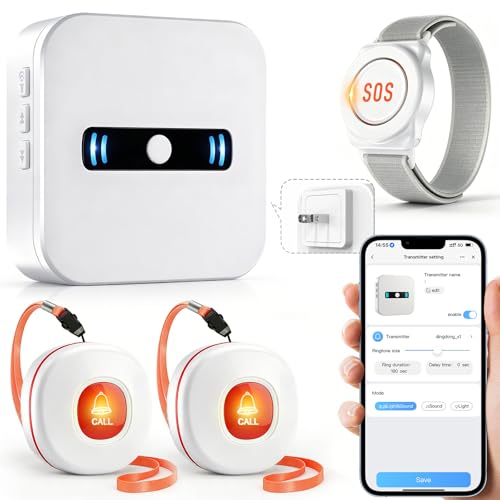
This kit expands to include two call buttons and one SOS watch with the same app-linked notification system. It’s best for households with multiple rooms or caregivers, ensuring alerts reach more than one recipient. The shared-app functionality helps coordinate responses. A limitation is the dependence on consistent app connectivity for timely alerts.
Who it’s best for: families needing multiple alert points and coordinated responses. Why selected: multi-button setup improves coverage for larger homes or complex routines.
Caution: Ensure all caregivers are comfortable using the app and notification sharing features.
CallToU Caregiver Pager 1 Receiver + 1 Transmitter

This option provides a single receiver and one transmitter, delivering a compact, cost-friendly solution with the same 500+ feet range. It is ideal for smaller living spaces or for first-time buyers who want a simple setup with clear alerts. The 55 ringtone options and adjustable volume help personalize the alert experience. A caveat is that fewer devices may mean less flexibility for larger homes.
Who it’s best for: individuals or couples seeking a straightforward single‑transmitter system. Why selected: simplicity and reliability in a compact package.
Buying Guide: How To Choose The Right SOS Button For Elderly
What type of alert delivery should you favor?
Decide between a local receiver system, a Wi‑Fi/app based setup, or a hybrid. Receiver systems offer immediate audible alerts in the home, while Wi‑Fi setups provide remote notifications to smartphones. Apps are useful for caregivers who are often away from the house but want real-time status.
How important is range and home layout?
For multi‑room homes or single-story layouts, prioritize products advertising long open‑area ranges (600–1000 feet). Indoors, walls and furniture can reduce actual range, so devices with strong indoor performance or wall‑penetrating connectivity are valuable.
How many caregivers or recipients need alerts?
If multiple people require alerts, look for systems with multiple buttons or shared app access. This helps coordinate responses and reduces the chance of missed alerts.
What about ease of use and maintenance?
Choose systems with simple plug‑in receivers, long‑life batteries, and intuitive apps. Consider how easy it is to mount transmitters or wear buttons as pendants for the person needing help.
Are there any environmental considerations?
Water and dust resistance, temperature tolerance, and IP ratings matter for use in kitchens, bathrooms, or outdoor areas. If the elder’s routine includes damp or dusty environments, look for appropriate protection levels.
What about data privacy and notifications?
Assess whether the system stores data, how alerts are delivered, and who can access shared notifications. Clear opt‑in and simple management of who is alerted is essential for privacy and safety.
FAQ
- What is the typical range for these SOS buttons? Many systems advertise 500+ feet in open areas, with indoor performance often reduced by walls and furniture.
- Can multiple family members receive alerts? Yes, several models offer shared app notifications or multiple receivers to coordinate responses.
- Are these devices waterproof? Some devices have IP ratings or waterproof transmitters; check product details for exact ratings.
- Do I need smartphones or Wi‑Fi to use these? Some systems operate via dedicated receivers; others rely on Wi‑Fi and a mobile app. Choose based on family tech comfort and home network.
- How do I mount or wear the buttons? Options include neck straps, wall brackets, or belt clips—select based on the user’s mobility and comfort.
- Is professional installation required? Most are plug‑and‑play, but larger multi‑room setups may benefit from planning for optimal receiver placement.