Looking for a talking blood pressure monitor that’s easy to use, especially for seniors or visually impaired users? These devices announce readings aloud, store multiple measurements, and provide clear color indicators to help you understand your blood pressure at a glance. Below are five top options that balance accuracy, usability, and accessibility, with clear reasons who each is best for.
Buyer’s quick guide: the following table highlights who each model is best for, memory capacity, and standout features to help you compare at a glance.
| Product | Best For | Key Feature | Memory |
|---|---|---|---|
| Hetaida Blood Pressure Monitor | Seniors, caregivers | Voice reading, color status display | 2×99 readings |
| Easy@Home EBP-703 | First-time users | One-touch operation, large 3-color LED display | Not specified |
| ProHeal Talking Monitor | Low-vision users | Voice announcements, large backlit display | 3-user memory |
| Greetmed Wrist Monitor | Wrist users, portability | Voice broadcast, easy one-button use | 2 users, 90 readings each |
| Alcedo Upper Arm Monitor | Home users needing memory | Talking function, two-user memory | 2×120 readings |
Hetaida Upper Arm Talking Blood Pressure Monitor

Best for: seniors or caregivers who want automatic, easy-to-read results with intuitive color cues. This model uses a smart pressurization system and irregular heartbeat alerts, plus an on-screen color status that helps users gauge whether readings are in the normal, elevated, or high range. The large cuff fits 8.7″ to 16.5″ arms, supporting a wide user base. The built-in voice reading makes it suitable for users who prefer audio feedback. Caution: the device relies on batteries or USB power; ensure you have a power source available during use.
Why selected: It combines a talking readout with an intuitive color-backlit system and a wide cuff, making it practical for daily family use and for those who want quick, glanceable data alongside audible results.
Easy@Home EBP-703 Talking Blood Pressure Monitor

Best for: first-time buyers and seniors who want a simple, one-button setup with clearly readable results. The large three-color LED display indicates hypertension levels at a glance, and the built-in voice function reads results aloud. It’s a straightforward choice for households seeking minimal setup and day-to-day reliability. Caution: no Bluetooth; data won’t auto-sync to a phone without manual entry or app support outside of the listed features.
Why selected: The combination of one-button operation, a bright display, and a vocal readout makes this monitor exceptionally accessible for those new to home BP monitoring or for users who prefer spoken feedback.
ProHeal Talking Blood Pressure Monitor for Seniors
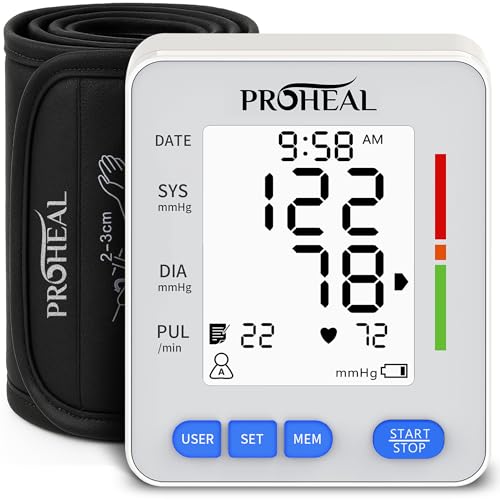
Best for: seniors and users who need clear spoken feedback with a large display. This device announces systolic, diastolic, and pulse, supporting three user profiles and a backlit display with color indicators. It’s well-suited for households monitoring multiple people over extended periods. Caution: memory is described as 3 users; verify your storage needs if you plan to track many weeks of data.
Why selected: The voice-reading feature, along with a large backlit display and multiple user support, makes it a strong multi-user option for families or clinics seeking straightforward, audible data.
Alcedo Upper Arm Blood Pressure Monitor

Best for: home users who want a dependable two-user memory with a talking function. The device stores reading data for two users across 120 measurements per user, and it features an easy-to-read LCD display along with audible readings. The adjustable cuff is designed for comfortable use at home. Caution: ensure the cuff size matches your arm for the most accurate readings as cuff fit affects results.
Buying Guide: Key Purchase Considerations
What should you consider when choosing a talking blood pressure monitor?
- Voice features and language options: Look for clear, adjustable volume and language choices to match your needs.
- Display readability: Large, backlit digits help readability for seniors or those with low vision.
- Memory capacity: Decide how many users and how many readings you need stored locally to track trends.
- Arm vs wrist: Upper-arm cuffs generally offer more consistent results; wrist models are more portable but may require careful placement.
- Alerts and indicators: Color-coded indicators and irregular heartbeat alerts add quick context to readings.
- Power source options: Check whether the model uses batteries, USB power, or AC adapters and how that fits your setup.
Simple Comparison by Use Case
- Best for seniors who want audible guidance: ProHeal or Hetaida.
- Best for first-time buyers who prefer simplicity: Easy@Home EBP-703.
- Best for multi-user households: Alcedo or ProHeal.
- Best for portability and wrist-friendly use: Greetmed Wrist Monitor.
FAQ
- Do talking BP monitors offer accurate results?
Yes, most models rely on standard oscillometric methods and provide audible results to accompany the display readings.
- Can multiple people share a single monitor?
Many models support two or more memory profiles; verify the exact number of user profiles and capacity in the product specs.
- Is it important to use a cuff that fits properly?
Yes. An ill-fitting cuff can skew readings; ensure the cuff size matches your arm measurement for accuracy.
- Are there monitors that read in Spanish or bilingual formats?
Some models offer bilingual audio options; check the product features for language availability.
- Can I use these devices without a smartphone or app?
Most talking models operate independently, though some offer optional app connectivity or data transfer through USB or Bluetooth where indicated.
- What safety features should I expect?
Look for irregular heartbeat alerts, cuff error messages, and clear volume controls to ensure easy, safe operation.