The top choice depends on the caregiver’s needs and the senior’s situation. This article highlights five Elderly Care video monitors best suited for no-WiFi setups, simple SOS alerts, medication reminders, and reliable two-way communication. Ideal buyers include family caregivers seeking privacy, seniors needing reminders, and care facilities looking for portable, easy-to-use monitors. The following quick table helps compare key points for the selected products at a glance.
| Product | Best For | Key Feature |
|---|---|---|
| Elderly Monitor With Camera And Audio (Zaguoroo) | Senior at home; no WiFi needed | Night vision, temp alert, 24/7 monitor |
| JEMXITG Elderly Monitor (No WiFi) | Privacy-focused households | 2-way talk; SOS button; long battery life |
| Smart Caregiver Video Monitor (No WiFi) | Portable care in motion | Rechargeable; infrared night vision; secure connection |
| Elderly Monitors With Camera (Sair pet) | Memory reminders and alerts | Medicine reminders; multiple alerts |
| KEENLUK 4.3″ Screen Camera | Direct family communications | HD two-way video; local storage option |
Elderly Monitor With Camera And Audio (Zaguoroo)

Best for households needing a no-WiFi video monitor with immediate SOS and medication reminders. This Zaguoroo model includes a one-touch call button, two-way audio, infrared night vision, temperature alerts, and a no-WiFi design that supports independence and safety. The device helps caregivers respond quickly when a senior presses the SOS or falls. The active VOX option allows the screen to dim during quiet moments, conserving power, while the screen wakes with noise. It’s especially suitable for seniors living independently but requiring occasional caregiver check-ins.
Who it’s best for: caregivers seeking a simple, wall-to-wall monitoring solution for single-room usage and seniors who prefer a straightforward interface with tactile controls. The no-WiFi design reduces privacy concerns and simplifies setup. A potential limitation is reliance on local wireless connections; ensure the base station is placed where signals remain stable throughout the home.
JEMXITG Elderly Monitor (No WiFi)
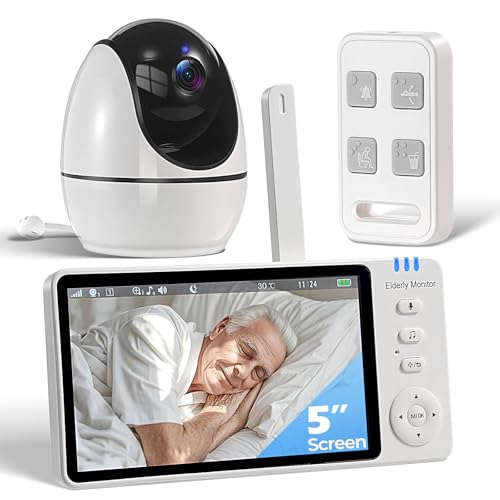
Better for privacy-conscious households that want extended battery life and a simple push-button SOS. JEMXITG’s unit operates without Wi-Fi, includes a dedicated SOS button, medication alerts, temperature monitoring, infrared night vision, and VOX voice activation. A large-capacity 3500mAh battery reduces charging frequency, making it suitable for households where caregivers may not be nearby constantly. A potential limitation is that no Wi-Fi may restrict remote monitoring flexibility, requiring proximity to the base station for real-time updates.
Who it’s for: families prioritizing privacy and off-network security with longer battery life. Choose this if you want robust on-device features and minimal data exposure. Consider alternative if remote access from outside the home is needed.
Smart Caregiver Video Monitor For Elderly
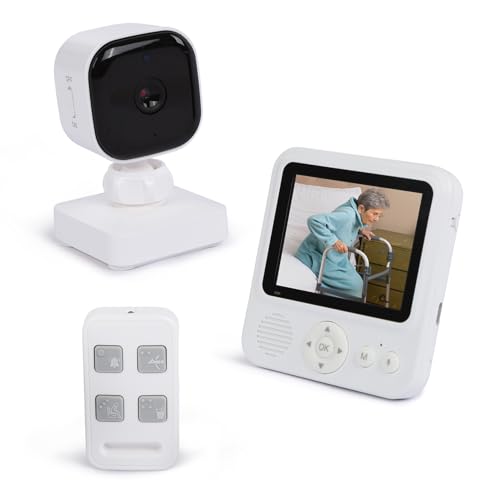
Best for portable, cordless monitoring. This Smart Caregiver model emphasizes a secure, interference-free connection without WiFi, infrared night vision for nighttime checks, and a rechargeable camera setup. The included wireless caregiver call button adds a straightforward alert mechanism for immediate assistance. It is well-suited for caregivers who move around the house and want to monitor multiple rooms without plugging in devices constantly. Limitation: the 2.8-inch screen is compact, which may require closer viewing compared to larger screens.
Who it’s for: active caregivers who need mobility and privacy in a compact system. Choose this for quick, on-the-go monitoring and less dependence on a fixed setup. Consider a larger screen if the caregiver prefers broader visibility at a glance.
Elderly Monitors With Camera And Audio (Sair pet)

Best for medication reminders and multi-alert scenarios. This monitor features a robust set of alerts including medicine reminders, SOS, fall, toilet, and drink water reminders, along with 2-way audio and infrared night vision. It’s designed for seniors who require routine reminders to support memory and daily activities. A useful limitation is the need for consistent proximity to the monitor to ensure timely alerts; check the layout of living spaces to avoid blind spots.
Who it’s for: seniors with memory challenges or those needing structured daily routines. Choose this if medication scheduling and activity prompts are a priority. If privacy or long-range monitoring is essential, consider a WiFi-enabled option for remote oversight.
KEENLUK Home Security Camera With 4.3″ Screen
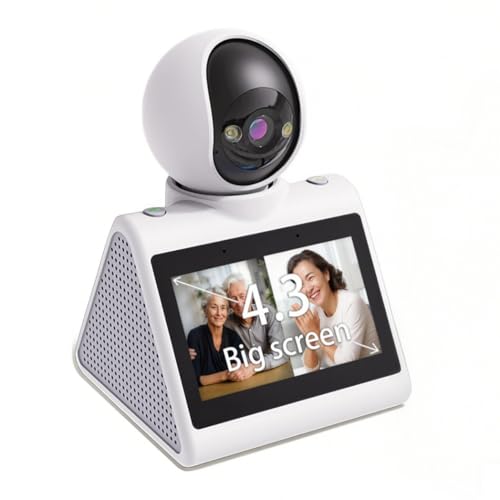
Best for direct family communication and secure local video calls. KEENLUK provides a 4.3-inch screen for easy viewing, two-way video calling, and device-to-device calling within a home network. It supports 1080P HD video and motion detection, with options for local storage via SD card. It’s suitable for households seeking a central, shared family monitoring device. A potential limitation is reliance on 2.4G WiFi for device-to-device features, which may constrain remote monitoring without an internet connection.
Buying Guide
What to consider before buying
- No WiFi vs. WiFi: Choose no-WiFi models for privacy and simple setup, or WiFi-enabled systems if you need remote access.
- Alerts and reminders: Look for SOS buttons, medication reminders, drink-water prompts, and fall alerts to support daily care.
- Two-way audio and VOX: Two-way communication helps caregivers check in; VOX conserves battery by waking the screen on sound.
- Power and portability: Rechargeable batteries and portable form factors are beneficial for multi-room monitoring.
- Screen size and visibility: Larger screens ease viewing for caregivers; consider screen brightness and night vision quality.
- Privacy and security: Ensure devices use secure connections and avoid unnecessary data transmission when privacy is a priority.
How to compare features quickly
- Compare SOS options: One-press buttons vs. multiple alert types; assess what events require caregiver attention most.
- Assess battery life: Longer battery life reduces charging interruptions, especially in no-WiFi devices.
- Check range and home layout: Ensure the device can cover the needed living spaces without dead zones.
- Evaluate ease of use: Tactile buttons, clear displays, and universal remote controls help seniors interact confidently.
FAQ
- Do these systems require WiFi to work?
- What is the best option for someone who needs medication reminders?
- Can these monitors be used across multiple rooms?
- What is the typical battery life for portable monitors?
- Are these devices compliant with privacy requirements?
- Is two-way talk necessary for effective monitoring?