Finding an effective wrist alarm system for an elderly loved one requires balancing accessibility, reliability, and ease of use. This article reviews five top options that emphasize quick alerts, clear notifications, and comfortable wear. Each product is described with its standout features to help caregivers choose solutions for home care, assisted living, or nursing facilities. The table below provides a quick snapshot of the selected models.
| Product | Brand | Key Feature | Typical Use |
|---|---|---|---|
| PILSAMAS WiFi Caregiver Pager | PILSAMAS | Wi-Fi hub, 328ft range, app alerts | Home, hospital, nursing facility |
| Homedics WakeBand | Homedics | Silent wake vibrations, 81 combos | Morning wake-ups, shift workers |
| CallToU Wrist Call Button | CallToU | Personal wearable alarm, easy to wear | Home care, nursing units |
| Daytech Caregiver Pager | Daytech | 900 ft open range, simple caregiver alerts | Private homes, facilities |
| CNVNTAO Vibrating Alarm Wristband | CNVNTAO | 8 vibration patterns, long battery life | Sleep support, wake reminders |
PILSAMAS WiFi Caregiver Pager System

PILSAMAS offers a caregiver pager system with a wristband and multiple call buttons. The hub connects to 2.4G Wi-Fi for app access and uses 433MHz technology to reach devices up to 328 feet through walls. When a button is pressed, the hub flashes a red LED and sounds an alarm, while the app displays who needs help and where. Features include 18 adjustable tones and 4 volume levels, device naming, and family-wide alert sharing. Lifetime free updates and notifications are included; SMS or email alerts require an optional plan.
Homedics WakeBand Silent Vibrating Alarm Wristband
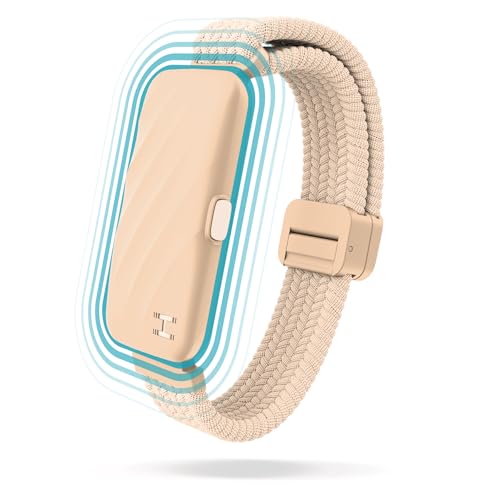
The WakeBand emphasizes silent wake-up with gentle wrist vibrations, helping avoid disturbing others. It is designed for various routines, including early risers and night-shift workers, and offers 81 customizable combinations across nine alarm modes and nine vibration intensities. This versatility lets caregivers tailor wake alerts to individual preferences while maintaining comfort and discreet operation.
CallToU Wrist Call Buttons for Caregivers
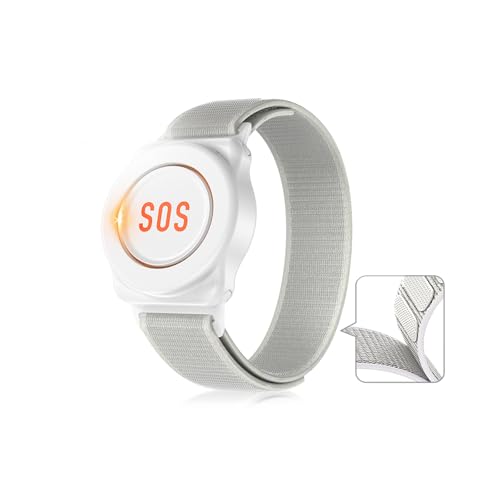
CallToU presents a wrist-worn call button designed for seniors, paired with a separate receiver. The design prioritizes gentle wearability with upgraded quick-release nylon bands. The device serves as a personal wearable alarm to request assistance and is well-suited for home care and nursing units, with the receiver providing flexible caregiver mobility.
Daytech Wireless Caregiver Pager System
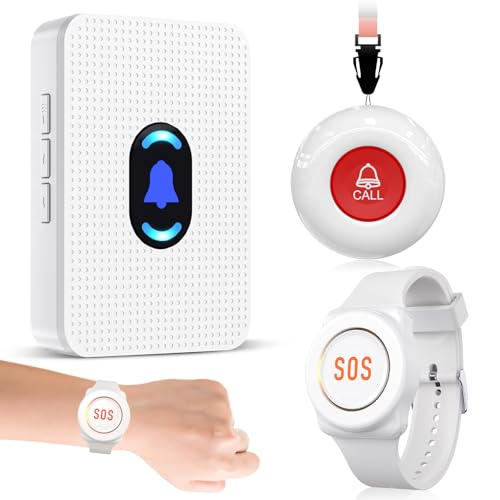
Daytech delivers a wireless alert system designed to restore privacy and autonomy for elderly users. The setup supports a one-to-one link between a button and a receiver, with a practical range up to 100 feet (30 meters). It is suitable for private homes and institutions, enabling quick caregiver alerts through a simple press of the button or pager—enhancing response times in daily routines and emergencies.
CNVNTAO Vibrating Alarm Wristband

The CNVNTAO wristband uses soft, quiet vibrations to wake sleepers without loud sounds. It features eight alarm sets and an adjustable fit for wrist sizes 12 to 19 cm. The design focuses on reducing disturbance while delivering reliable wake or reminder alerts, making it a practical option for bedtimes, medication reminders, and routine cues in shared spaces.
Buying Guide
Key factors influence the effectiveness of wrist alarm systems for elderly users. Consider these perspectives to match needs with capabilities:
- Range and connectivity: Determine whether the system uses a local wireless link, Wi‑Fi hub, or cellular integration. Consider the home layout and walls that may affect signal strength.
- Alert clarity: Look for audible alarms paired with clear visual signals. Adjustable tones, volumes, and vibration intensity help accommodate hearing loss and noise sensitivity.
- Wearability and comfort: Wristbands should be lightweight, adjustable, and skin-friendly. Quick-release straps can aid independence for the user.
- Ease of setup and maintenance: A simple pairing process and intuitive app or receiver interface reduce caregiver burden. Check for updates and optional service plans.
- Water resistance and durability: IP ratings and rugged construction extend usability in bathrooms, kitchens, and everyday environments.
- Battery life and power options: Longer life minimizes maintenance, while rechargeable options offer convenience for around-the-clock use.
- Privacy and data sharing: Some systems enable family-wide alerts and history logs. Ensure data sharing aligns with user preferences and safety needs.
- Emergency integration: Consider whether the system can integrate with medical devices, fall detection, or caregiver paging across multiple rooms or facilities.
In practice, choosing between a wearable vibration alarm and a caregiver paging system depends on the living situation. A purely bed- or bathroom-focused setup may benefit from a motion sensor or bedside alert, while a caregiver-pager model suits families needing quick, remote notification across rooms or spaces. For facilities, a combined approach using both quick local alerts and remote app notifications can maximize safety and response times.
When evaluating options, align features with daily routines, caregiver availability, and the elder’s preferences. Prioritize systems with clear alerts, dependable hardware, and straightforward maintenance to ensure sustained effectiveness over time.